Tell the App Your Target Mix. It Tells You What to Buy This Month.


Last week I wrote that dividend tax was next and a rebalancing helper after that. I did them in the other order, and I'm not going to pretend that was a plan. The rebalancer is the thing I kept opening a spreadsheet for on Sunday evenings, and at some point you stop arguing with yourself about the roadmap.
It nearly shipped with a number in it that would have been hard to live down. When the app asks for an exchange rate and the lookup fails, the value it gets back is 1. It gets a 1 in the half second before the real answer arrives, too. So a reader working in Czech koruna, looking at a portfolio priced in dollars, would have been told to buy roughly twenty-three times too much of everything, in confident bold type. A 1 on a pair that isn't identical now means "I don't know yet", and while the rate is unknown every amount stays in the currency of the analysis, with the screen saying which one that is.
You set the split, it does the arithmetic
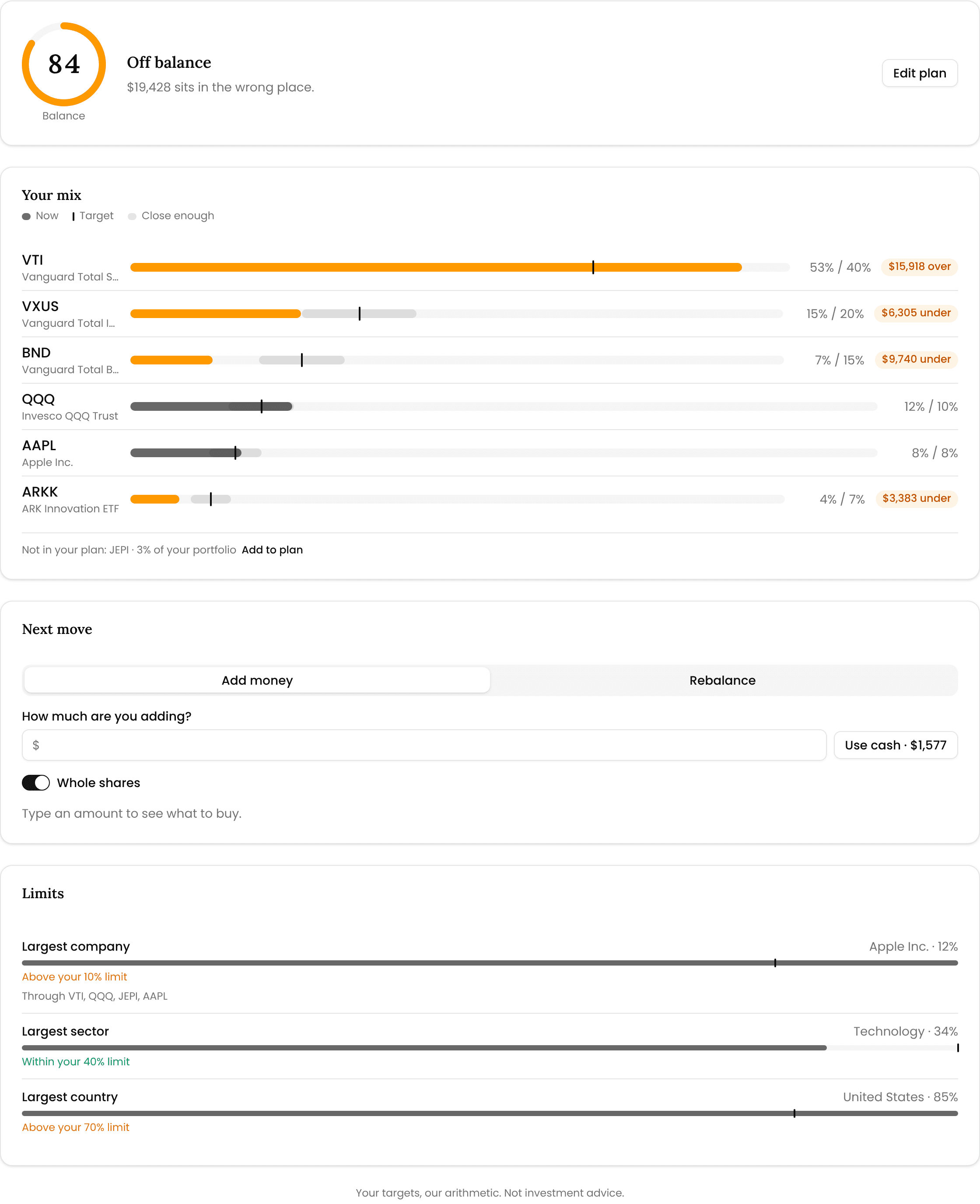
There's a fourth tab on the portfolio page, next to Overview and Profit & taxes. Balance answers three questions: where am I against my plan, what do I buy next, and what would a full rebalance take.
You set the plan once. Pick a starting point (keep my current mix, equal weight, core and satellites) or drag each holding to the percentage you want. After that the page is a score, a bar per holding with a tick where the target sits, and a Next move box. Type in what you're adding this month and it tells you what to buy, in whole shares, because no broker sells you 2.7 of anything. "Buy 3 × VWCE" with the rough cost beside it is what I wanted the spreadsheet to say at eleven at night.
Poke at it without an account in the live demo — the Balance tab already has a plan in it.
Two rules I'd defend in a pub argument. A holding that isn't in your plan is never bought and never sold; it sits to one side, untouched, because selling what you never asked me to sell is how you get a tax bill you didn't plan for. And "Rebalance" measures what's too big against what the portfolio is worth after your contribution, not before. Against today's value, adding 1,000 to a 600/400 split told you to sell 100 of the bigger fund and buy 500 of it straight back: two order lines for one ticker, and a taxable sale for nothing.
Under it, a Limits card reads your biggest single company, sector and country through your funds rather than off the labels on the front of them. In the demo Apple is 12% of the portfolio, spread across four holdings.
The car, the private shares, the thing with no tab
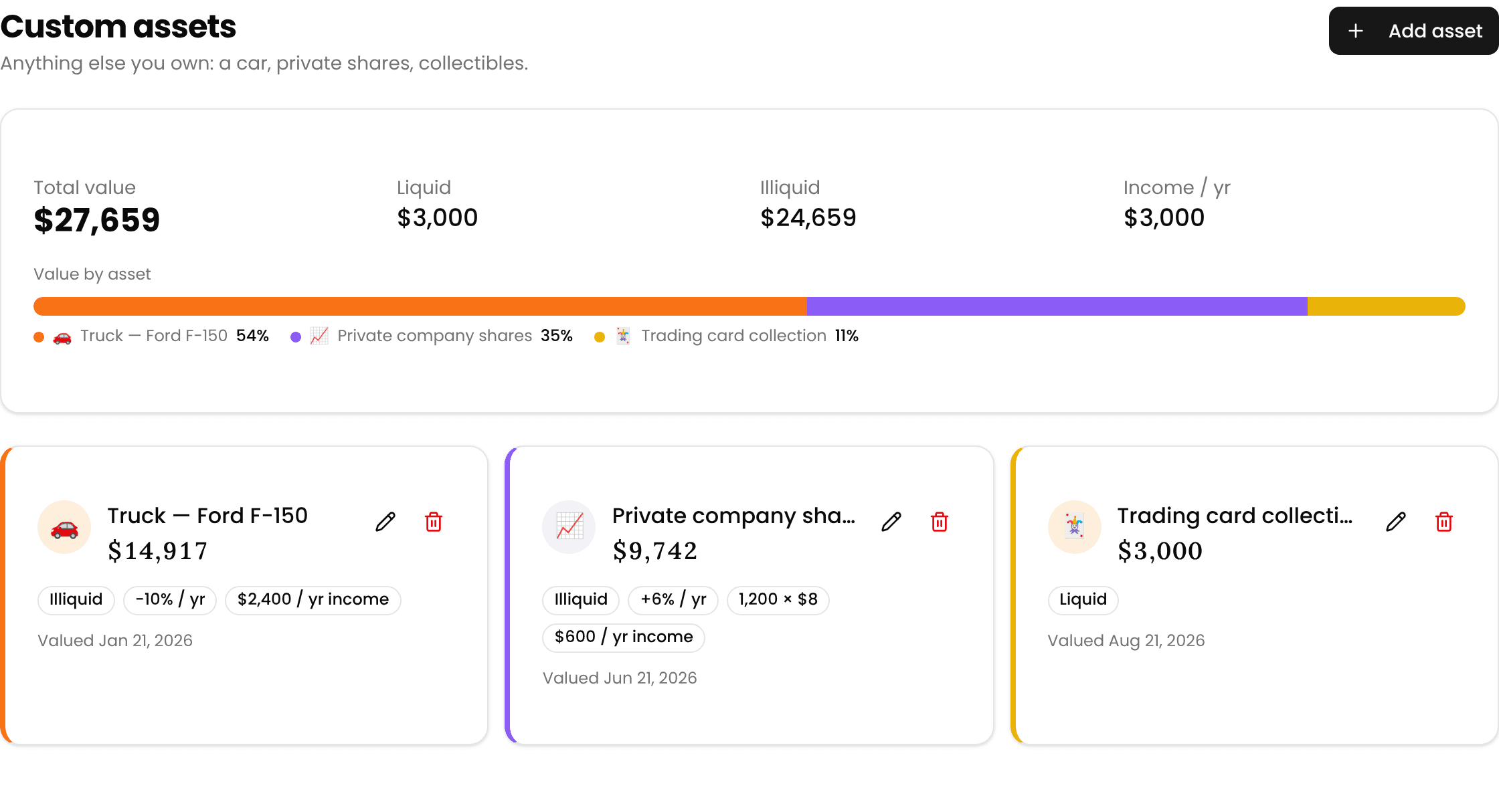
Net worth grew an eleventh category, which is mostly an admission that ten was never going to cover it. Custom assets: a car, a stake in a friend's company, a collection, a boat. A name, an icon, its own colour in the breakdown, one amount or a quantity times a price, and an optional yearly change that is allowed to be negative. Mine is. My car loses about a tenth of its value a year, and I'd rather see that than a flattering flat line.
If the thing pays you, there's a yearly income field, and that income turns up in your retirement paycheck beside rental income. What it won't do is let a car fund your retirement: anything you mark illiquid counts in net worth and stays out of the projection unless you overrule it. A pickup does not compound at equity returns.
The week I spent on phones
This is the part I'm least proud of and most relieved about. Reordering your net worth accounts used to be a drag on a 24-pixel handle. On a phone that isn't a fiddly feature, it's no feature at all, so every card now carries Move up and Move down below tablet width. Transactions were a nine-column table you had to pinch and pan; each row is a card now. Toasts landed exactly on the bottom navigation and blocked it until they timed out. Two of the number fields you touch most zoomed the whole page in on iOS, every time. The add-transaction form and the statement importer open as sheets from the bottom, where your thumb already is.
Two more. Norway joined properly, 348 funds across DNB, KLP, Storebrand, SKAGEN, Delphi and eight other houses. And the demo's pension search matched a hand-written list of 23 funds while the real app searched about 1,600; it reads the real registry now.
What I'm on next
The portfolio pages are getting a proper rework. They've grown by accretion for a year and it shows. Dividend tax is still owed, and yes, I'm aware I wrote that sentence last week too. Bank connections and the Android app are still on the board.
The lesson of the week is the drag handle. I built account reordering on a laptop, tested it on a laptop, and shipped something that simply did not exist for anyone holding a phone. I don't think that was laziness. I never once asked the question, which is worse, because laziness at least knows it's happening.
Stay Updated
Get notified about new articles and MFFT build-in-public updates.
Ready to Apply This?
Start tracking your finances today and put these tips into practice.
- Import bank statements in seconds
- AI-powered categorization
- Beautiful visualizations
- Set and track financial goals
Related posts
 Build In Public
MFFT Learned Pounds and Rand. One Long Fund Name Nearly Stopped It.
The UK tax year starts on 6 April and MFFT finally knows it, South African rand stopped reading as a hundred times too much, and your uninvested cash now has exactly one place to live instead of two.
 Build In Public
I Said You'd Stop Uploading Broker Files. This Week You Can.
Your broker can fill in the portfolio itself now, read-only by construction, and the cash sitting there finally counts as money. Plus the fund-coverage badge that had been quietly meaning something else entirely.
 Build In Public
I Deleted the Code That Guessed What's Inside Your Funds
I built a look-through that shows what your pension and bank funds actually hold, then deleted the half of it that was guessing. Plus insurance as a real net-worth asset, and a net worth page that finally answers whether you're diversified.
 Build In Public
MFFT Now Costs Money. Writing That Sentence Was the Hard Part.
MFFT started charging this week. The billing code took an afternoon; the paragraph explaining the price took four days. Plus settings going from eight tabs to four, a delete button that never worked for Google accounts, and 132 more funds.
 Build In Public
Someone Emailed: My Fee Numbers Were Wrong. He Was Right.
A user emailed to say MFFT's fund fees looked wrong. He was right: a hand-maintained list I never taught to expire. Plus everything else that shipped this week.